> ## Documentation Index
> Fetch the complete documentation index at: https://docs.kyos.bot/llms.txt
> Use this file to discover all available pages before exploring further.
# Lockdown
Setup the channel lockdown system inside your server
## What does this do?
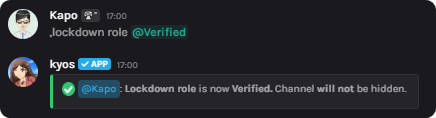
The lockdown system allows you to lockdown channels inside your server. You can setup a dedicated role for the lockdown system, whether to hide the channel upon lock, or ignore channels from the **lockdown all** function. Aside from most bots defaulting for the **@everyone** role, this provides customization.
## Setting the lockdown role
Set the lockdown role kyos will use when locking channels
```javascript syntax theme={null}
,lockdown role (role)
```
```javascript example theme={null}
,lockdown role @Member
```
```javascript example with flags theme={null}
,lockdown role @Member --hide
// --hide makes it so upon locking the channel it is not visible
```
 ## Ignoring a channel
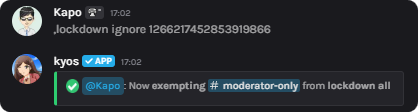
Upon using **lockdown all**, you may want to ignore certain channels. With this, you can do it. If you wish to remove an ignored channel, just re-execute the command.
```javascript syntax theme={null}
,lockdown ignore (channel)
```
```javascript example theme={null}
,lockdown ignore #moderator-only
```
## Ignoring a channel
Upon using **lockdown all**, you may want to ignore certain channels. With this, you can do it. If you wish to remove an ignored channel, just re-execute the command.
```javascript syntax theme={null}
,lockdown ignore (channel)
```
```javascript example theme={null}
,lockdown ignore #moderator-only
```
 ## Locking all channels
If you wish to lock all channels at one time, execute the **lockdown all** command.
**Lockdown ignored** channels will not be affected.
```javascript syntax theme={null}
,lockdown all
```
## Viewing your configurations(s)
`,lockdown configuration`
`,lockdown ignored`
## Locking all channels
If you wish to lock all channels at one time, execute the **lockdown all** command.
**Lockdown ignored** channels will not be affected.
```javascript syntax theme={null}
,lockdown all
```
## Viewing your configurations(s)
`,lockdown configuration`
`,lockdown ignored`