> ## Documentation Index
> Fetch the complete documentation index at: https://docs.kyos.bot/llms.txt
> Use this file to discover all available pages before exploring further.
# Antinuke
Configure your server's antinuke protections
To **fully** protect your server, we urge you to read this **whole** page thoroughly
## How does it work?
The antinuke works via threshold. If the perpetrator crosses **x** in a certain time frame, x being the threshold you set, they will be punished. Custom punishments may be set for every trigger, in which you can `ban`, `kick`, `stripstaff` or `jail` the user attemping to harm your server.
## Protection Guides
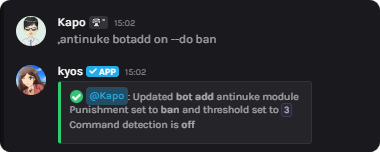
You may prevent **bot joins** inside your server with the following command
To add a bot to the server, the **inviter** and **bot** must be **antinuke whitelisted**
```javascript Syntax theme={null}
,antinuke botadd (on/off) (parameters)
```
```javascript Example theme={null}
,antinuke botadd on --do ban
```
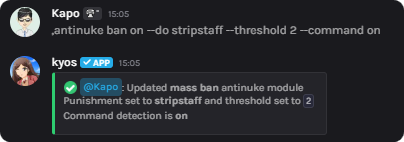
 To prevent mass banning, execute the following command
```javascript Syntax theme={null}
,antinuke ban (on/off) (parameters)
```
```javascript Example theme={null}
,antinuke ban on --do stripstaff --threshold 2 --command on
```
To prevent mass banning, execute the following command
```javascript Syntax theme={null}
,antinuke ban (on/off) (parameters)
```
```javascript Example theme={null}
,antinuke ban on --do stripstaff --threshold 2 --command on
```
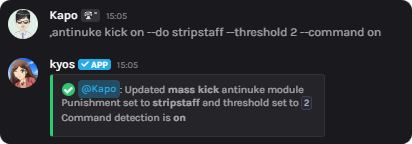
 To prevent mass member kicking, execute the following command
```javascript Syntax theme={null}
,antinuke kick (on/off) (parameters)
```
```javascript Example theme={null}
,antinuke kick on --do stripstaff --threshold 2 --command on
```
To prevent mass member kicking, execute the following command
```javascript Syntax theme={null}
,antinuke kick (on/off) (parameters)
```
```javascript Example theme={null}
,antinuke kick on --do stripstaff --threshold 2 --command on
```
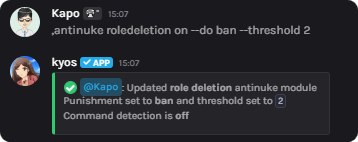
 You may prevent **mass role deletion** inside your server with the following command
```javascript Syntax theme={null}
,antinuke roledeletion (on/off) (parameters)
```
```javascript Example theme={null}
,antinuke roledeletion on --do ban --threshold 2
```
You may prevent **mass role deletion** inside your server with the following command
```javascript Syntax theme={null}
,antinuke roledeletion (on/off) (parameters)
```
```javascript Example theme={null}
,antinuke roledeletion on --do ban --threshold 2
```
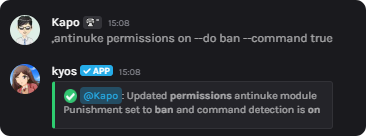
 To prevent **dangerous** roles or permissions being given, execute the following command
This will prevent **dangerous roles** and **dangerous permissions** being given out.
```javascript Syntax theme={null}
,antinuke permissions (on/off) (parameters)
```
```javascript Example theme={null}
,antinuke permissions on --do ban --command true
```
To prevent **dangerous** roles or permissions being given, execute the following command
This will prevent **dangerous roles** and **dangerous permissions** being given out.
```javascript Syntax theme={null}
,antinuke permissions (on/off) (parameters)
```
```javascript Example theme={null}
,antinuke permissions on --do ban --command true
```
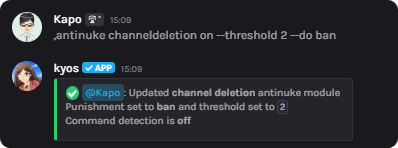
 To prevent **channels** being **mass deleted**, execute the following command
```javascript Syntax theme={null}
,antinuke channeldeletion (on/off) (parameters)
```
```javascript Example theme={null}
,antinuke channeldeletion on --threshold 2 --do ban
```
To prevent **channels** being **mass deleted**, execute the following command
```javascript Syntax theme={null}
,antinuke channeldeletion (on/off) (parameters)
```
```javascript Example theme={null}
,antinuke channeldeletion on --threshold 2 --do ban
```
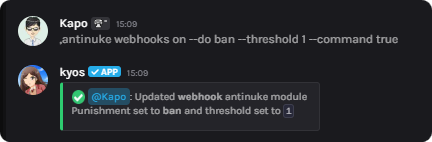
 To prevent **malicious webhooks**, execute the following command
This will watch for mass **creations** and **deletions**
```javascript Syntax theme={null}
,antinuke webhooks (on/off) (parameters)
```
```javascript Example theme={null}
,antinuke webhooks on --do ban --threshold 1 --command true
```
To prevent **malicious webhooks**, execute the following command
This will watch for mass **creations** and **deletions**
```javascript Syntax theme={null}
,antinuke webhooks (on/off) (parameters)
```
```javascript Example theme={null}
,antinuke webhooks on --do ban --threshold 1 --command true
```
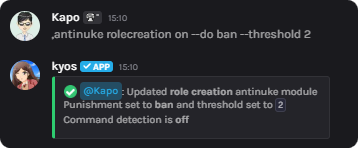
 You may prevent **mass role creation** inside your server with the following command
```javascript Syntax theme={null}
,antinuke rolecreation (on/off) (parameters)
```
```javascript Example theme={null}
,antinuke rolecreation on --do ban --threshold 2
```
You may prevent **mass role creation** inside your server with the following command
```javascript Syntax theme={null}
,antinuke rolecreation (on/off) (parameters)
```
```javascript Example theme={null}
,antinuke rolecreation on --do ban --threshold 2
```
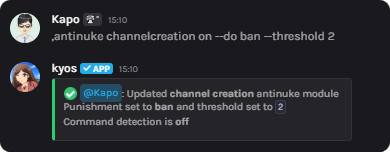
 To prevent **mass channel creation**, execute the following command
```javascript Syntax theme={null}
,antinuke channelcreation (on/off) (parameters)
```
```javascript Example theme={null}
,antinuke channelcreation on --do ban --threshold 2
```
To prevent **mass channel creation**, execute the following command
```javascript Syntax theme={null}
,antinuke channelcreation (on/off) (parameters)
```
```javascript Example theme={null}
,antinuke channelcreation on --do ban --threshold 2
```
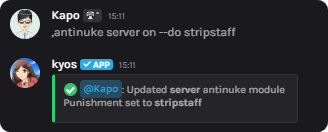
 To prevent **malicious server changes**, execute the following command
kyos will revert most server changes, however, things such as **vanity** and **icons** cannot be reverted automatically
```javascript Syntax theme={null}
,antinuke server (on/off) (parameters)
```
```javascript Example theme={null}
,antinuke server on --do stripstaff
```
To prevent **malicious server changes**, execute the following command
kyos will revert most server changes, however, things such as **vanity** and **icons** cannot be reverted automatically
```javascript Syntax theme={null}
,antinuke server (on/off) (parameters)
```
```javascript Example theme={null}
,antinuke server on --do stripstaff
```
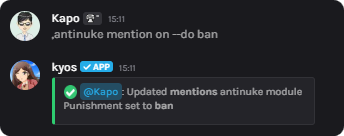
 To punish those **mass pinging**, execute the following command
To block it before even being sent, we recommend your configure your server's **built-in Discord automod**
```javascript Syntax theme={null}
,antinuke mention (on/off) (parameters)
```
```javascript Example theme={null}
,antinuke mention on --do ban
```
To punish those **mass pinging**, execute the following command
To block it before even being sent, we recommend your configure your server's **built-in Discord automod**
```javascript Syntax theme={null}
,antinuke mention (on/off) (parameters)
```
```javascript Example theme={null}
,antinuke mention on --do ban
```
 ## User Management Guide
To add antinuke admins, or whitelist users, follow this guide.
### Adding an antinuke admin
To add a user as an antinuke admin, execute the `antinuke admin` command
To remove an antinuke admin, re-execute the command.
```javascript Syntax theme={null}
,antinuke admin (member)
```
```javascript Example theme={null}
,antinuke admin @kap.v2
```
### Whitelisting a user from the antinuke
To whitelist a user from the antinuke, execute the `antinuke unwhitelist` command
To unwhitelist a user, do `antinuke unwhitelist (user)`
```javascript Syntax theme={null}
,antinuke whitelist (user)
```
```javascript Example theme={null}
,antinuke whitelist @kap.v2
```
### Viewing the antinuke admins
View the antinuke admins
Only the server owner may use this command
```javascript Syntax theme={null}
,antinuke admins
```
### Viewing the antinuke whitelisted users
View the antinuke whitelisted users
```javascript Syntax theme={null}
,antinuke whitelisted
```
## Parameters
You may use the following flags across the antinuke to configure each module
**NOTE:** Some modules may not support the `--threshold` or `--command` parameter. However, we urge you to use the `--command on` flag where applicable.
A threshold is the number of times somebody can do an action before triggering the antinuke.
```javascript Syntax theme={null}
--threshold (digit)
```
```javascript Example theme={null}
,antinuke massban on --threshold 3
```
The punishment kyos will initiate once a user triggers the antinuke.
### Available punishments
* `ban` - Bans the user from the server
* `kick` - Kicks the user from the server
* `stripstaff` - Removes a users roles
* `jail` - Jails the user
```javascript Syntax theme={null}
--do (punishment)
```
```javascript Example theme={null}
--do stripstaff
```
Dictates whether commands should contribute towards the threshold (eg. `kick`)
```javascript Syntax theme={null}
--command (on/off)
```
```javascript Example theme={null}
--command on
```
## Antinuke admins
Only give this to **trusted administrators**
Ensure you trust your antinuke admins as a server owner, kyos **will not** take action on them.
Antinuke admins may do the following:
1. Edit thresholds
2. Configure triggers (such as **disabling** massban protection)
3. Hardban users (visit **help hardban**)
4. View your antinuke Configuration
5. Whitelist users from the antinuke (resulting in kyos **not** taking action against them)
They may **not** do the following:
1. Disable or enable your antinuke
2. Add other antinuke admins
3. View the antinuke admins
## User Management Guide
To add antinuke admins, or whitelist users, follow this guide.
### Adding an antinuke admin
To add a user as an antinuke admin, execute the `antinuke admin` command
To remove an antinuke admin, re-execute the command.
```javascript Syntax theme={null}
,antinuke admin (member)
```
```javascript Example theme={null}
,antinuke admin @kap.v2
```
### Whitelisting a user from the antinuke
To whitelist a user from the antinuke, execute the `antinuke unwhitelist` command
To unwhitelist a user, do `antinuke unwhitelist (user)`
```javascript Syntax theme={null}
,antinuke whitelist (user)
```
```javascript Example theme={null}
,antinuke whitelist @kap.v2
```
### Viewing the antinuke admins
View the antinuke admins
Only the server owner may use this command
```javascript Syntax theme={null}
,antinuke admins
```
### Viewing the antinuke whitelisted users
View the antinuke whitelisted users
```javascript Syntax theme={null}
,antinuke whitelisted
```
## Parameters
You may use the following flags across the antinuke to configure each module
**NOTE:** Some modules may not support the `--threshold` or `--command` parameter. However, we urge you to use the `--command on` flag where applicable.
A threshold is the number of times somebody can do an action before triggering the antinuke.
```javascript Syntax theme={null}
--threshold (digit)
```
```javascript Example theme={null}
,antinuke massban on --threshold 3
```
The punishment kyos will initiate once a user triggers the antinuke.
### Available punishments
* `ban` - Bans the user from the server
* `kick` - Kicks the user from the server
* `stripstaff` - Removes a users roles
* `jail` - Jails the user
```javascript Syntax theme={null}
--do (punishment)
```
```javascript Example theme={null}
--do stripstaff
```
Dictates whether commands should contribute towards the threshold (eg. `kick`)
```javascript Syntax theme={null}
--command (on/off)
```
```javascript Example theme={null}
--command on
```
## Antinuke admins
Only give this to **trusted administrators**
Ensure you trust your antinuke admins as a server owner, kyos **will not** take action on them.
Antinuke admins may do the following:
1. Edit thresholds
2. Configure triggers (such as **disabling** massban protection)
3. Hardban users (visit **help hardban**)
4. View your antinuke Configuration
5. Whitelist users from the antinuke (resulting in kyos **not** taking action against them)
They may **not** do the following:
1. Disable or enable your antinuke
2. Add other antinuke admins
3. View the antinuke admins