> ## Documentation Index
> Fetch the complete documentation index at: https://docs.kyos.bot/llms.txt
> Use this file to discover all available pages before exploring further.
# Autoresponders
Setup an autoresponder for trigger words. If the word is said, kyos will respond with your desired message.
You may send an embed in your response message following the scripting guide **[here](https://docs.kyos.bot/resources/embeds)**
## Creating an Autoresponder
You **must** separate the **trigger** and the **response** with a `,`
To create an autoresponder, execute the `autoresponder add` command
```javascript syntax theme={null}
,autoresponder add (trigger), (response) (flags)
```
```javascript example theme={null}
,autoresponder add documentation, https://docs.kyos.bot/ --reply --self_destruct 20 --not_strict
```
 ## Removing an autoresponder
This will delete the **given** autoresponder, to delete **all**, use `all` as the trigger argument
You may remove an autoresponder with the `autoresponder remove` command
```javascript syntax theme={null}
,autoresponder remove (trigger)
```
```javascript example theme={null}
,autoresponder remove documentation
```
## Removing an autoresponder
This will delete the **given** autoresponder, to delete **all**, use `all` as the trigger argument
You may remove an autoresponder with the `autoresponder remove` command
```javascript syntax theme={null}
,autoresponder remove (trigger)
```
```javascript example theme={null}
,autoresponder remove documentation
```
 ## Viewing the autoresponders
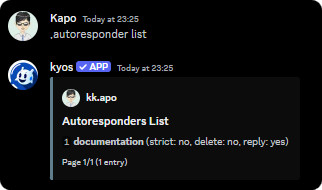
To view the current autoresponders, you can use the `autoresponder list` command
```javascript syntax theme={null}
,autoresponder list
```
## Viewing the autoresponders
To view the current autoresponders, you can use the `autoresponder list` command
```javascript syntax theme={null}
,autoresponder list
```
 ## Flags
Flags can be added to your autoresponder to allow more customization.
The `--not_strict` flag makes kyos respond to the trigger even if it does not match the trigger exactly.
```javascript example command usage theme={null}
,autoresponder add docs, https://docs.kyos.bot --not_strict
```
The `--reply` flag makes kyos **reply** to the trigger message.
```javascript example command usage theme={null}
,autoresponder add docs, https://docs.kyos.bot --reply
```
The `--delete` flag makes kyos **delete** the trigger message.
```javascript example command usage theme={null}
,autoresponder add docs, https://docs.kyos.bot --delete
```
The `--self_destruct` flag makes kyos **delete** the response message after a specified number of seconds. Must be between `6s`-`40s`
```javascript example command usage theme={null}
,autoresponder add docs, https://docs.kyos.bot --self_destruct 20
```
## Miscellaneous
Execute `autoresponder clear`
## Flags
Flags can be added to your autoresponder to allow more customization.
The `--not_strict` flag makes kyos respond to the trigger even if it does not match the trigger exactly.
```javascript example command usage theme={null}
,autoresponder add docs, https://docs.kyos.bot --not_strict
```
The `--reply` flag makes kyos **reply** to the trigger message.
```javascript example command usage theme={null}
,autoresponder add docs, https://docs.kyos.bot --reply
```
The `--delete` flag makes kyos **delete** the trigger message.
```javascript example command usage theme={null}
,autoresponder add docs, https://docs.kyos.bot --delete
```
The `--self_destruct` flag makes kyos **delete** the response message after a specified number of seconds. Must be between `6s`-`40s`
```javascript example command usage theme={null}
,autoresponder add docs, https://docs.kyos.bot --self_destruct 20
```
## Miscellaneous
Execute `autoresponder clear`