> ## Documentation Index
> Fetch the complete documentation index at: https://docs.kyos.bot/llms.txt
> Use this file to discover all available pages before exploring further.
# Commands Management
Manage commands inside your server, restrict or disable commands
Command disabling is not imposed on those with the `administrator` permission
## Restricting a command
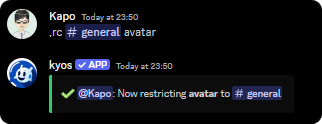
Restrict a command to a channel or role within your server
```javascript syntax theme={null}
,restrictcommand (channel or role) (command)
```
```javascript example theme={null}
,restrictcommand #general avatar
```
 ## Unrestrict command
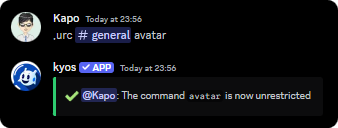
To unrestrict a command, use the `urc` command
```javascript syntax theme={null}
,unrestrictcommand (channel or role) (command)
```
```javascript example theme={null}
,unrestrictcommand #general avatar
```
## Unrestrict command
To unrestrict a command, use the `urc` command
```javascript syntax theme={null}
,unrestrictcommand (channel or role) (command)
```
```javascript example theme={null}
,unrestrictcommand #general avatar
```
 ## Viewing the restricted commands
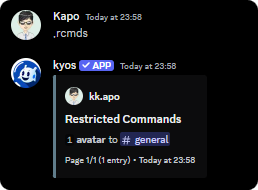
To view the currently restricted commands, use the `restrictedcmds` command
```javascript syntax theme={null}
,restrictedcmds
```
## Viewing the restricted commands
To view the currently restricted commands, use the `restrictedcmds` command
```javascript syntax theme={null}
,restrictedcmds
```
 ## Disabling a command
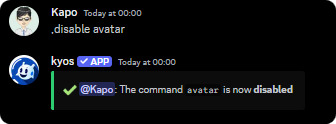
To disable a command, use the `disable` command
Members with the `administrator` permission bypass disabled commands
```javascript syntax theme={null}
,disable (command)
```
```javascript example theme={null}
disablecommand avatar
```
## Disabling a command
To disable a command, use the `disable` command
Members with the `administrator` permission bypass disabled commands
```javascript syntax theme={null}
,disable (command)
```
```javascript example theme={null}
disablecommand avatar
```
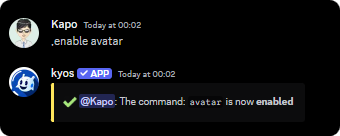
 ## Enable a command
To enable a command, use the `enable` command
```javascript syntax theme={null}
,enable (command)
```
```javascript example theme={null}
,enable avatar
```
## Enable a command
To enable a command, use the `enable` command
```javascript syntax theme={null}
,enable (command)
```
```javascript example theme={null}
,enable avatar
```
 ## Viewing the disabled commands
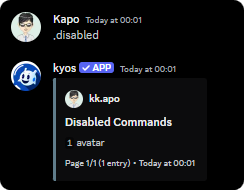
To view the currently disabled commands, use the `disabled` command
```javascript syntax theme={null}
,disabled
```
## Viewing the disabled commands
To view the currently disabled commands, use the `disabled` command
```javascript syntax theme={null}
,disabled
```
 # Related Commands
To disable a **module**, use the `disablemodule` command
```javascript example theme={null}
,disablemodule lastfm
```
To enable a **module**, use the `enablemodule` command
```javascript example theme={null}
,enablemodule lastfm
```
# Related Commands
To disable a **module**, use the `disablemodule` command
```javascript example theme={null}
,disablemodule lastfm
```
To enable a **module**, use the `enablemodule` command
```javascript example theme={null}
,enablemodule lastfm
```