> ## Documentation Index
> Fetch the complete documentation index at: https://docs.kyos.bot/llms.txt
> Use this file to discover all available pages before exploring further.
# Levelling
Reward your members for being active in your server.
## Getting Started
For a **first time setup**, you must execute the `levels on` command for kyos to start tracking xp. After this, you can continue with the rest of this guide and customise the levelling system to your liking.
## Ignoring channels and roles
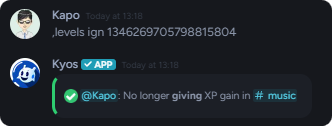
Ideally, you should ignore channels you do **not** want kyos to give XP gain in, to do this use the following command
To **no longer** ignore a channel, simply re-run the command.
```javascript Syntax theme={null}
,levels ignore (channel)
```
```javascript Example theme={null}
,levels ignore #music
```
 ## Customizing level-up messages
You may customise the **level up** message for your member level ups.
You must include the `{old.level}` or `{new.level}` variable in your message!
```javascript Syntax theme={null}
,levels message (text)
```
```javascript Example theme={null}
,levels message {embed}$v{content: Congratulations {user.mention}, you've leveled up the level `{new.level}`!}
```
### Set the level-up message location
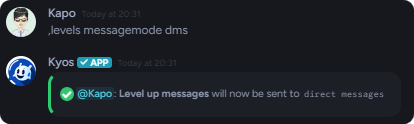
To set the destination of level-up messages, use the following command.
The **default** destination is the context channel
```javascript Syntax theme={null}
,levels messagemode (dms, channel, off, or current)
```
```javascript Example theme={null}
,levels messagemode #level-up
,levels messagemode pm
```
## Customizing level-up messages
You may customise the **level up** message for your member level ups.
You must include the `{old.level}` or `{new.level}` variable in your message!
```javascript Syntax theme={null}
,levels message (text)
```
```javascript Example theme={null}
,levels message {embed}$v{content: Congratulations {user.mention}, you've leveled up the level `{new.level}`!}
```
### Set the level-up message location
To set the destination of level-up messages, use the following command.
The **default** destination is the context channel
```javascript Syntax theme={null}
,levels messagemode (dms, channel, off, or current)
```
```javascript Example theme={null}
,levels messagemode #level-up
,levels messagemode pm
```
 ## Changing a member's level
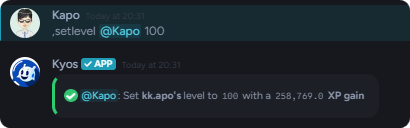
You may give/remove XP, or force set a member's level.
These commands require the **administrator** permission!
```javascript Syntax theme={null}
,setlevel (member) (level)
,setxp (member) (xp)
```
```javascript Example theme={null}
,setlevel (user) 100
,setxp (user) 50000
,setxp (user) -50000
```
## Changing a member's level
You may give/remove XP, or force set a member's level.
These commands require the **administrator** permission!
```javascript Syntax theme={null}
,setlevel (member) (level)
,setxp (member) (xp)
```
```javascript Example theme={null}
,setlevel (user) 100
,setxp (user) 50000
,setxp (user) -50000
```
 ## Changing the XP gain multiplier
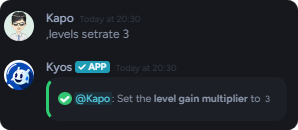
You may change the rate at which XP is given.
```javascript Syntax theme={null}
,levels setrate (multiplier)
```
```javascript Example theme={null}
,levels setrate 3
```
## Changing the XP gain multiplier
You may change the rate at which XP is given.
```javascript Syntax theme={null}
,levels setrate (multiplier)
```
```javascript Example theme={null}
,levels setrate 3
```
 ## Related commands
Use the `rank (user)` command to view another member's rank progress.
To view the users with the highest levels, use the `levels leaderboard` command
If you wish to maintain data, but temporarily disable XP gain entirely, use the `levels lock` command
To **unlock** the levelling system, use the `levels unlock` command
## Related commands
Use the `rank (user)` command to view another member's rank progress.
To view the users with the highest levels, use the `levels leaderboard` command
If you wish to maintain data, but temporarily disable XP gain entirely, use the `levels lock` command
To **unlock** the levelling system, use the `levels unlock` command