> ## Documentation Index
> Fetch the complete documentation index at: https://docs.kyos.bot/llms.txt
> Use this file to discover all available pages before exploring further.
# Reaction Roles
Setup reaction roles for members to receive roles from message reactions
## Adding a reaction role
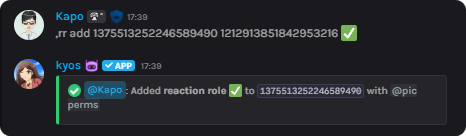
To add a reaction role, use the `reactionroles add` command
```javascript syntax theme={null}
,reactionroles add (message) (role) (emoji)
```
 ## Removing a reaction role
To remove **all** reaction roles, use `reactionroles clear`
To remove a reaction role, use the `reactionroles remove` command
```javascript syntax theme={null}
,reactionroles remove (message)
```
```javascript syntax theme={null}
,reactionroles remove (message id)
```
## Viewing Reaction Roles
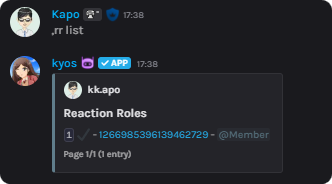
To view the active reaction roles, execute `reactionroles list`
```javascript syntax theme={null}
,reactionroles list
```
## Removing a reaction role
To remove **all** reaction roles, use `reactionroles clear`
To remove a reaction role, use the `reactionroles remove` command
```javascript syntax theme={null}
,reactionroles remove (message)
```
```javascript syntax theme={null}
,reactionroles remove (message id)
```
## Viewing Reaction Roles
To view the active reaction roles, execute `reactionroles list`
```javascript syntax theme={null}
,reactionroles list
```
 ## Use cases
Reaction roles can be used for a **multitude** of things inside your server. We will list a couple here.
1. Verification system - Users react to your rules message to receive your verified role
2. Booster roles - Open channels to your server boosters where they can react to receive another role
3. Color, content, or age roles - It also allows you to to configure all of those in **3 minutes or less!**
## Use cases
Reaction roles can be used for a **multitude** of things inside your server. We will list a couple here.
1. Verification system - Users react to your rules message to receive your verified role
2. Booster roles - Open channels to your server boosters where they can react to receive another role
3. Color, content, or age roles - It also allows you to to configure all of those in **3 minutes or less!**