> ## Documentation Index
> Fetch the complete documentation index at: https://docs.kyos.bot/llms.txt
> Use this file to discover all available pages before exploring further.
# Scheduling
Scheduled channel cloning or deletion for up to 7 days, or a repeating cycle.
## Creating a schedule
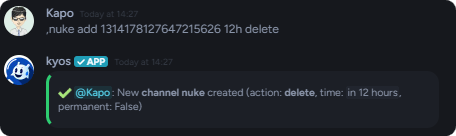
Create a **new** channel nuke. Choose between cloning or deleting, and set a time.
```javascript syntax theme={null}
,nuke add (channel) (time) (clone/delete)
```
```javascript example theme={null}
,nuke add 1314178127647215626 12h delete
```
 ## Remove a schedule
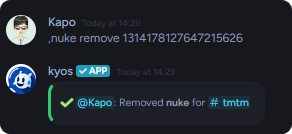
Remove a schedule, this will **permanently** remove it and it cannot be restored unless a new schedule is created.
```javascript syntax theme={null}
nuke remove (channel)
```
```javascript example theme={null}
nuke remove 1314178127647215626
```
## Remove a schedule
Remove a schedule, this will **permanently** remove it and it cannot be restored unless a new schedule is created.
```javascript syntax theme={null}
nuke remove (channel)
```
```javascript example theme={null}
nuke remove 1314178127647215626
```
 ## Editing a schedule
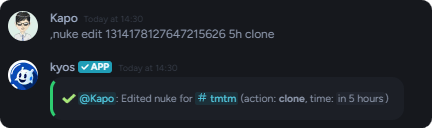
Editing the schedule allows you to adjust it's **time** and **action**. To do it, run the following command:
```javascript syntax theme={null}
nuke edit (channel) (time) (clone/delete)
```
```javascript example theme={null}
nuke edit 1314178127647215626 5h clone
```
## Editing a schedule
Editing the schedule allows you to adjust it's **time** and **action**. To do it, run the following command:
```javascript syntax theme={null}
nuke edit (channel) (time) (clone/delete)
```
```javascript example theme={null}
nuke edit 1314178127647215626 5h clone
```
 ## Viewing the list of schedules
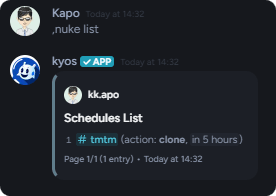
To view all the current nukes, run `nuke list`
```javascript syntax theme={null}
nuke list
```
## Viewing the list of schedules
To view all the current nukes, run `nuke list`
```javascript syntax theme={null}
nuke list
```