

Module: Autoresponder
Setup an autoresponder for trigger words. If the word is said, kyos will respond with your desired message.
You may send an embed in your response message following the scripting guide here
Creating an Autoresponder
autoresponder add command

Removing an autoresponder
This will delete the given autoresponder, to delete all, use
all as the trigger argumentautoresponder remove command

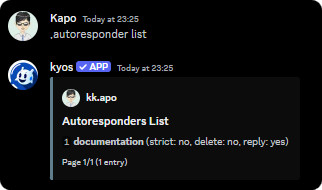
Viewing the autoresponders
autoresponder list command
Flags
Not strict
Not strict
The
--not_strict flag makes kyos respond to the trigger even if it does not match the trigger exactly.Delete
Delete
The
--delete flag makes kyos delete the trigger message.Self destruct
Self destruct
The
--self_destruct flag makes kyos delete the response message after a specified number of seconds. Must be between 6s-40sMiscellaneous
Removing all autoresponders
Removing all autoresponders
Execute
autoresponder clear